Never Answer the Same Question Twice
Building a self-learning helpdesk inside Slack with Switch (peopledesk )
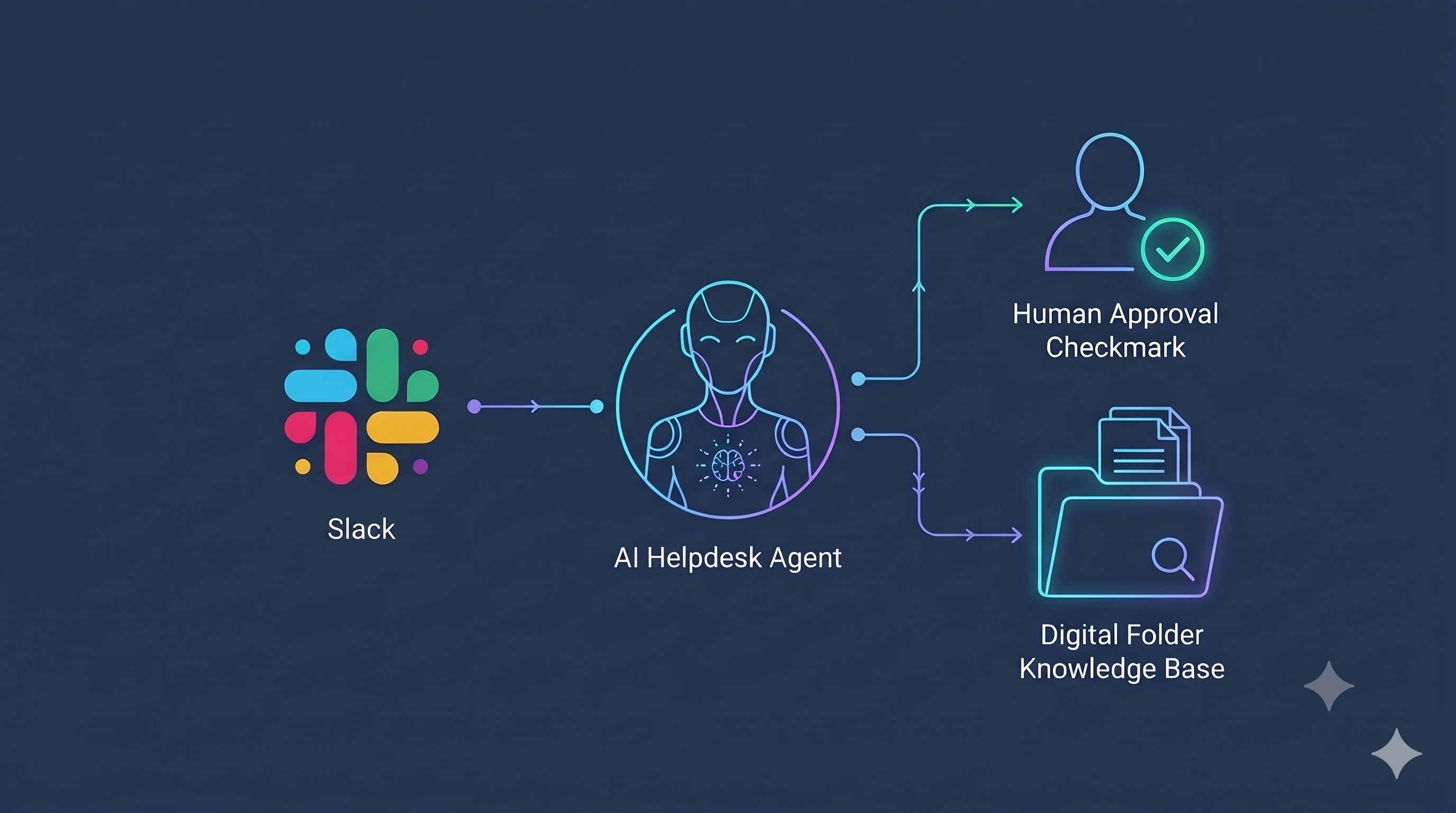
The Short Version
- The problem: Repetitive questions about leave and VPNs bury real work, and approvals get lost in threads with no clear owner.
- What I built: PeopleDesk, an HR and IT helpdesk agent that lives in a Slack channel. It answers from a knowledge base, routes tickets to humans, and drafts a new article every time a problem gets solved.
- The core rule: The agent never acts in isolation. Permissions follow identity. Employees can't approve their own leave, non-helpers can't resolve tickets, and sensitive topics go straight to a human.
- The stack: Switch, OpenCode, Docker, the Slack API, and Wispr Flow.
The Monday Morning Problem
Every team has the same Monday.
Someone asks how many sick leaves they get. Someone's VPN is down again. A leave request is buried in a thread and nobody is sure who's allowed to approve it.
The answers exist, but they live in documents nobody opens. The approvals live in chat with no owner.
Ticketing portals don't fix this because they pull people out of where they already talk. Regular Slack bots don't fix it either, because they have no structured state, no identity checks, and no permission boundaries.
So I built an agent that sits in the channel, answers from a knowledge base, opens a ticket when it's stuck, routes it to the right person, and gets smarter every time a human solves something.
What PeopleDesk Does
Architecture
Slack Channel
     |
     v
Switch (Room + Identity)
     |
     v
OpenCode Agent
  AGENTS.md | team.json | kb/*.md | tickets | requests
Key Features
1. Answers with sources
It replies from a Markdown knowledge base and names the exact article. It never invents policies, dates, or amounts.
2. Routes tickets
If the answer isn't in the knowledge base, it opens a ticket and tags the right person by topic, HR or IT.
3. Enforces permissions
Only the assigned helper can resolve a ticket. Only an employee's manager can approve their leave. Nobody can approve their own request.
4. Learns from humans
When a helper resolves a ticket, the agent drafts a new article. Once the helper approves it, the next person gets an instant answer.
5. Knows when to step back
Resignations, salary disputes, and legal questions go straight to a human instead of getting an AI guess.
6. Stays auditable
Helpers can edit articles, employees can flag outdated info, and managers can run a nudge command to recap open tasks.
Why Switch Is the Heart of It
The hackathon's question is simple: Would this project stop working without Switch?
For PeopleDesk, yes, for three reasons.
1. A Channel Becomes a Room
Humans and the agent read the same thread, so the agent behaves like a teammate instead of a detached bot.
2. Real Identity
Switch hands the agent every message along with the sender's authenticated handle.
That's what makes permission boundaries possible. When someone tries to self-approve or close another person's ticket, the agent checks the handle and says no.
3. No Plumbing
Register the agent once in the Switch Console, invite it into a channel, and your team can use it right away.
Without Switch, I'd be building Slack WebSocket listeners, user token mapping, identity middleware, and thread state tracking.
With it, the agent's rules are the product.
How It Works
There's no backend server and no database.
Switch invokes the agent as an OpenCode session on each message event, and the agent's folder is its memory.
Project Structure
| File | What it's for |
|---|---|
AGENTS.md |
Operating rules and permission boundaries |
team.json |
Helpers, managers, and the topics they own |
kb/*.md |
The knowledge base, version-controlled Markdown |
tickets.json |
Ticket state and lifecycle |
requests.json |
Approval workflows |
Build It Yourself
1. Install Docker and Switch Console
Install and start Docker Desktop, then download Switch Console and create a new local server instance.
2. Create the Slack App
Go to the Slack App Directory, choose:
Create New App → From an App Manifest
Pick your test workspace, and paste the standard Switch Slack manifest.
One thing to change: Remove the agent_view blocks and the assistant:write scope.
Declaring the app as a generic Slack Assistant can restrict guest permissions and force unwanted DM thread behavior.
3. Collect Your Credentials
Keep these in a local .env file and never commit it.
- App-level token: Under Basic Information → App-Level Tokens, with the
connections:writescope. Starts withxapp-. - Bot token: Under Install App → Bot User OAuth Token. Starts with
xoxb-. - Workspace ID: From your browser URL (
app.slack.com/client/T.../C...). Starts withT.
4. Connect Slack in Switch Console
Go to:
Server → Home → Messaging Apps → Connect Slack
- Enter a service name.
- Paste both tokens.
- When asked about account assignment, choose This is me.
On a free Slack plan, turn Agent name autocomplete off, since it needs a paid tier. People can still trigger the agent by typing its full name.
5. Create the Room
Make a channel like #peopledesk-test and run:
/invite @Agent Switch
It should appear under Your Rooms in the Console.
6. Set Up the Agent Folder
mkdir -p peopledesk-agent/kb
cd peopledesk-agent

touch AGENTS.md team.json tickets.json requests.json

echo "[]" > tickets.json
echo "[]" > requests.json
Then fill in team.json with your people:
team.json
{
  "people": [
    {
      "handle": "thomasjoshua466",
      "display": "Joshua",
      "role": "hr-manager",
      "handles_topics": ["hr", "leave", "payroll"],
      "manages": ["*"]
    },
    {
      "handle": "thomasjoshua098",
      "display": "Bob",
      "role": "it-admin",
      "handles_topics": ["it", "equipment", "vpn", "wifi"]
    }
  ]
}
Add a few starter articles to kb/, like:
leave-policy.mdwifi-vpn.md
Leave out some topics on purpose, such as health insurance or work-from-home rules, so you can watch the learning loop work live.
7. Register the Agent
In Switch Console, under Your Agents, click Add Agent and set:
| Setting | Value |
|---|---|
| Name | peopledesk.joshua |
| Provider | OpenCode |
| Directory | Path to peopledesk-agent |
| Execution mode | Auto mode on |
| Bypass permissions | Off |
| Access control | Include workspace members under Who can talk to your agent |
8. Invite It and Map the Handles
In your channel, run:
!invite-agent @peopledesk.joshua
Then ask it to list the room's participants and copy the exact handles into team.json.
That's what gives you identity control from the start.
The Brain: AGENTS.md
To keep the model fast and predictable, I wrote the rules as short numbered lines instead of long prose.
1. KNOWLEDGE FIRST:
   Always query kb/*.md before answering.
   Always cite the exact source file.

2. STICK TO FACTS:
   Never speculate on policy, compensation,
   or company dates.

3. CLARIFICATION:
   Ask at most ONE clarifying question per interaction
   before taking action.

4. TICKET CREATION:
   If kb/*.md lacks an answer, create an entry
   in tickets.json and tag the matching handle
   from team.json.

5. PERMISSION RULES:
   - Only the assigned helper handle can mark
     a ticket as "resolved".
   - Only the designated manager handle can
     approve/decline entries in requests.json.
   - Requesters can NEVER self-approve or
     self-resolve their own submissions.

6. LEARNING LOOP:
   When a helper resolves a ticket, draft a new
   .md document in kb/ and await approval
   from that helper.

7. SENSITIVE ESCALATION:
   Instantly escalate resignations, legal queries,
   or pay disputes directly to the HR manager.

8. CONCISE REPLIES:
   Keep all Slack output between 1 to 4 lines maximum.
Seeing It Work
I tested with three personas:
- Alice: Employee
- Bob: IT admin
- Joshua: HR manager
The boundaries held every time.
1. The Learning Loop
Alice:
"What health insurance plan do we have?"
PeopleDesk:
No record in the knowledge base. Created ticket T-002 and tagged @Joshua (HR).
Joshua:
Resolves the ticket with the policy terms.
The agent drafts kb/health-insurance.md, and Joshua replies:
"Approve"
Alice, the next day:
"What health insurance do we have?"
PeopleDesk:
"We provide Comprehensive Healthcare Plan B (Source: kb/health-insurance.md)."
2. Permission Refusals
Alice writes:
Resolved T-002
PeopleDesk:
"Refused. Only assigned helper (@Joshua) can resolve Ticket T-002."
Joshua tries to resolve an IT ticket assigned to Bob.
PeopleDesk:
"Refused. Ticket T-004 is assigned to IT Admin (@Bob)."
3. Self-Approval Block
Alice requests leave for Dec 20–24, then types:
Approve request R-001
PeopleDesk:
"Refused. Requesters cannot approve their own requests. Awaiting action from Manager (@Joshua)."
Lessons and Gotchas
1. Identity Uses Handles, Not Display Names
Display names change. Switch relies on the underlying handle (like thomasjoshua466), so always list the participants first before defining roles.
2. Use State Machines, Not Timers
Switch agents run on events and have no built-in cron.
For stalled tickets, I added a manual nudge command that scans tickets.json for open items and pings their owners.
3. Threads Trigger the Agent
In local Switch setups, replies in a thread trigger the agent without an @mention.
Keep threads focused, or turn on !follow-ups off for side discussions.
4. Keep JSON Writes Small
Since local JSON files are the datastore, tell the agent to append selectively instead of rewriting whole files.
It keeps responses fast.
Built by Voice
I wrote most of the prompt rules and documentation with Wispr Flow, speaking instead of typing.
What's Next?
- Private approvals: Moving sensitive pay and leave approvals into 1:1 agent DMs.
- Scheduled reminders: Using external webhooks or Slack Workflow Builder for periodic ticket rollups.
- New verticals: Adapting the template for university support desks and medical clinics.
Try It Yourself
- GitHub: https://github.com/thomasalex122/PeopleDesk
- Demo video: https://youtu.be/WTgWwW5M3Qo
- Built with: Switch Console, OpenCode, Docker, Slack API, Wispr Flow.
Comments
Join the discussionNo comments yet. Be the first to comment.


